Monday, May 31, 2010

Wannabe Picasa or Van gough? Just move and click grids!


Here's two great applications that will keep your creative mind occupied for hours. Making art was never so simple!

Play with composition grids and lines:
Composition with Javascript is an interactive work made using HTML, CSS, Javascript and jQuery, based on Piet Mondrian's “Composition with Yellow, Red, Black, Blue and Grey” (1920). It allows everybody deconstruct the original painting and form it again in whatever he or she wants. Lines are shiftable (just drag it with your mouse) and colours changeable (click on it). Texture of the painting was preserved for authentic look. One can play with composition, forms and colours, alter the harmony of the piece or even destroy it and compose something pictorial
Visit Composition with Javascript


Play with Paint splatters and get creative:
There are times when you really cant make up your mind to paint a picture. You could either look at some reference pictures and get a cue or maybe just randomly spill out some colorful paint in a random fashion and peek into the splatter to identify your next masterpiece! Enter Jackson Pollock's paint room where the intensity of your mouse's movement throws out varying degree of paint splatter. Click to change color. You could save your doodle or that masterpiece by exporting it into one of the allowed formats.
Visit Jackson Pollock Paintroom

Sunday, May 30, 2010

Round up: 50+ Awesome photoshop plugins for FREE

Adobe Photoshop is a great piece of software but albeit with a linear learning curve. The application comes with huge set of native filters and some thousands more from third party developers. Just install and one click with these filters could take your images to a whole new level and make your image manipulations lot easier!
Here's some of the finest filters for your application. FREE!!

Fotomatic: Traditional photography filters
A collection of 8 plug-in filters, very useful to those beginning photography and are interested to simulate image results of traditional photography techniques.

Download Fotomatic 1.3v


Chromagic: Chroma key software
If you need to extract a single colour from an image background then it doesn't get much easier than this! Just open a photo and click on the colour you want to extract and Chromagic will automatically make that colour transparent.
Download Chromagic 1.0


Image Inc.: Blending photos made easier
The purpose of this utility is to blend existing images in a very fast and easy way, using a layer mask for transparency. The process is simple ... load the base picture followed by a top layer image, then add a mask and the program automatically merges everything together.
Download Image Inc. 1.2


Create realistic water ripples
This plugin can create realistic reflective water puddles in your images with perspective correction. Try it out!
Download here

Photowiz BW styler
Convert your images to black and white with more precise options for contrast points and highlights.
Download here


 OptikVerve Labs: preset collections
A large number of photography image manipulation filters, from lighting to mood, fog effects and more.
Download here


ThePlugin site's image and video manip collection
This site is one huge resource depot for free photoshop plugins! Nearly listing about 100+ photo effects, frames, borders,environmental FX,  this site caters a wide variety of audience.
Download them here


Bleach Bypass effect
BleachBypass is a Photoshop-compatible plugin filter designed by Red Raw Media to digitally simulate the traditional film "bleach bypass" technique. You would have seen such effects in movies like "Saving Private Ryan" and "Three Kings"
Free and Paid available, the pro version gives tighter and advanced adjustments.
Download here

Hot Pixel: Remove digital noise from your photos
Red Raw Media's come up with an award winning digital noise removing software totally for free! One step process to remove those glowing and unwanted noise pixels from your images.
Download here


Image Beautifier: High key softfocus filter
One more quality filter from Red media, this Create flattering soft-focus, high-key and infra-red simulation effects... and do it all for FREE!
 Download here


Red Media Process FX [worth 30$ - now FREE]
This is a very useful filter if you would like to get the look and feel of a antique Lomo camera.  You can digitally simulate traditional film cross-processing techniques, creating skewed color effects that range from the subtle to the extreme.

Here's what the developers say "The best cross processing filter available anywhere, in use by professional photographers and imagemakers the world over!" 

Download Here


Loads of thanks to the Original Developers!! 

Hope you enjoyed this round ups. Have fun using them! Leave some comments below or maybe a thank you, so that i'll know if these filters helped you :)

Saturday, May 29, 2010

Interesting: Find people using Face search

I recently bumped on an interesting website http://www.facesaerch.com/ and guess what, it lets you search people's faces. You just type in..,say, a celebrity's name and it shows up all images that contain faces of that celebrity. The interface is kinda similar to cool iris image viewer. Face Saerch is supposedly Developed based on google AJAX API. You may find similar functionality in google search under more options, but hey, the 3d image viewer looks cool and uncluttered ;)
This could be a very useful tool if you vaguely remember that person's name and wanna look up in the database for matching faces.  Though, the drawback is, their database seems to be in process of updating, so some names might be left out. Check it out yourself!

Chat with a million strangers on chatroulette!

            Do you like chatting online? Maybe a video chat? How about chatting trying your luck with a total stranger at some random part of the world? Sounds cool? This is what Chatroulette lets you do! Chatroulette's been around for quite a while now, but i thought i should blog about it anyway, just to fill in the space of people who are not already aware of it.  Just hit one simple button and viola!, Chatroulette picks up a random stranger and throws their webcam feed on your screen and you are good to talk!
You can keep hitting the find random stranger button as many times as you want, a new person to chat with everytime! ;)
Chatroulette claims that it has more than a million users online at any given time.
All you have to do is, make sure that you have your webcam installed,visit their webpage here and chat away.

Friday, May 28, 2010

An evening with Microsoft Tag reader

Microsoft's officially launched their "TAG" application on May 27th 2010. I had a free evening that day and thought I should try it out, you know, just to see how the stuff works. I kinda liked the appz. So here's how it all began.


7:00pm - in front of my PC
I navigated to Microsoft Tag homepage and I was required to login with my live account before i could play around with the tag creator. Upon logging in, i was taken to a really neat layout that had three simple functions, create, track or edit Tags. Nice!

7:10pm - setting up my windows mobile
You need a reader + internet connection to be able to read the tag informations as all data is relayed from their servers. After going through a few "about tag" pages on their website, i bumped on to the reader...Atlast! I got the *.cab file and proceeded to install it. It was around 300kb, so it was all done in a jiffy.

7:12pm - Creating the tag
Creation of tag was pretty straightforward and simple, so i created this test tag to see if it works the way it claims. I clicked on create, and the wizard asked me a couple of questions like a title to the tag, a link or text, and the type of layout i wanted. After keying out the info, it took a couple of seconds and suggested me to print it out. I opted to save my tag as a Jpeg, as this is a test tag, just for sake of convenience and green environment! ;)

7:15pm - Tag! You are mine!
I fired up Tag reader on my windows mobile 6.1 (yes its kinda outdated) and it asked me approve a set of EULA agreements. The appz initiated my camera mobile along with a onscreen cross mark that said requested me to point at any tag image. I pointed it at the jpeg that i created few minutes earlier. For a few seconds nothing seemed to happened as there was no status indicator. I thought it might have been buggy and as i was about to take away my phone from the tag image, suddenly a msg poped up quoting "Tag scanned successfully" and executed the function i embeded in it. I actually had it say "Success, your appz reads tag" ;)
 I had my pocket pc connected to wifi network at my place so the whole process was lot faster than our Indian GPRS networks ;)

I am starting to like this tag application. I took a print out of couple of tag images and stuck them as notes all over my desk! lol it was fun.
Could have some true potential but I'm not sure how far would this go in terms of productivity. We gotta wait and see!

7:30pm - some wicked ideas creep into my mind 
I googled for some tag images made by others and woah, loads showed up! I am gonna go on tag scanning spree to see what info they hold!!  


Click here to see if you mobile reads microsoft Tag images. As a prerequisite, you should have the tag reader installed in your mobile. You can get it here. All major mobile OSes are supported.

And here's the tag to madzindia blog. If you feel generous, just take a print out of this one and stick it as a note in your desks ;)

Update: Consolidated tutorial on using Microsoft Tag

* Visit http://tag.microsoft.com and login to your live account.
* Click on create a tag on your dashboard
* Key in required details (sample below)

*create and render them in any format you see fit
*You are all set! Have fun and spread the word!

Thursday, May 27, 2010

Evolution: scientists find Fishes that has hands

We all know evolution happens and almost all of the creatures evolve gradually over a million of years. But here's the strangest thing, Nat Geo people report that Scientists have identified nine new species of fishes off the coast of Australia, that seem to have hands,..or atleast protrusion that looks very similar to hand.These nine new species, listed as vulnerable, seem to walk on ocean floor rather than using their fins to wade through water.


You know, the picture on above kinda reminds me of classic horror movie cartoons and their sea monsters ;)


You can read more about this on the nat geo page
And special thanks to my friend "Enigma" who mailed me about this :)

Wednesday, May 26, 2010

Quick Charge your Apple Iphone Ipod or iAnything!!

Asus has come out with a piece of software called the ASUS AI charger.  They claim that the software can take any average Personal computer [PC] and convert it into an intelligent and a flexible powering station for your iPods, iPhone and such.

Here's a quote from ASUS
Ai Charger turns any PC into a flexible power-up station for popular Apple devices through a simple USB connector, extending their usability and benefit in every lifestyle. Charging goes up to 50% faster* and smoother while you do your work or have fun – whether at home or on the go.

 Sounds interesting. Download here. Cant wait to try it out!

PS: I would love to read your comments on the charger, let me know. And, I kinda like this," iAnything!" term.. Nice! ;)
 Source: Click here

Monday, May 24, 2010

100% free stock photos

If you are looking to work with stock photos in your projects but dont wanna buy them or download them illegally, here's a round up of good stock photography site for you. All of them feature pretty good quality images and are 100% free and legal. The main contents come from amateur,professional and semi professional  photographers who contribute to the site under creative commons. Well, that apart, check out these sites.
 I will add more as i keep digging out good ones...

http://www.stockvault.net/  [my fav] [sample img above]
http://www.free-stockphotos.com/category/free-images/
http://www.freedigitalphotos.net/ [paid but low res free ones]

Saturday, May 22, 2010

Understanding Google wave

Hey!
 Google Wave has gone public and is now available for everyone! All you need is a google account and you are all set to wave, literally! This article will try to explain some basic features of the wave and will help you get started using this great innovation.
The dashboard
Lets call the homepage of the google wave as "The dashboard" for the sake of convenience. Here's a screenshot of the dashboard.

The top left is your navigation menu. It contains a host of other options and add on applications called extensions that aims to ease your work and simplify your collaboration requirements. 
The bottom left panel is where your existing contacts are shown. You can also add/remove contacts in this panel. Even drag drop works!
The third panel, the inbox panel is just like your email inbox. This is the place where all your waves, conversations are archived chronologically. The upper tab also allows you to search within the inbox message contents very quickly. 
The panel at the extreme right is the place where all your wave activity, ranging from sharing pictures, editing documents, chat, group discussions takes place. There are self descriptive icons for each of the functions supported. 
All the panels of the dashboard are fully resizable and can also be minimized or hidden when required. 


Initiate a wave meet
Let us start by clicking a blank wave as shown below.
This will throw you a new panel as shown below. 


Choose to accept google gears if prompted. This will fasten up your page load times. Now to add contact, drag drop your contacts on the wave panel and you are now ready to start a wave meet with your friend. 
The chatting occurs in real time i.e your friends can see as you type. They need not wait until you hit the enter key! The level of interactivity has been considerably improved. Unlike conventional methods, you can just simply drag drop images from you computer to the wave panel and its shared instantly.


 A thumbnail preview is shown and can be maximized on to a clean black background too. Just like those online flash galleries.


The User Interface [UI] is quite intuitive and works just the way you want it, though google claims that there might be some bugs still. Say you accidentally added your friend to your boss's meeting and you want him removed, no need to head over to options, stumble onto remove contact. This time you do it in google style, yes, you guessed it, just drag and drop him back to your contacts list. He will be immediately removed from your meeting list. 
Here's a video from Google highlighting some special features of their wave:


The overall interface of the google wave is neat, clean, simple, intuitive and quite appealing. Google wave, A revolution in human collaboration?? 


Google joins celebration of pacman's 30th anniversary

Its been indeed quite a looooooooonngggg time since our classic favorite PAC MAN series was introduced and know what, its already the 30th anniversary! 30 years of eating dots and saving pac girl over and over again! ;)
The whole world may or may not cherish this day, heck, might not even  remember it, but there's one internet giant that has taken steps to ensure that everyone notices it! Google is known for its variable homepage doodle graphics. They were usually static images depicting art, tech, math, science and stuff. But on pacman's 30th anniversary, Google has made an interactive Pacman doodle, yes, it completely playable!! Visit their homepage, just hit the "insert coin" button and eat away! Hurry, do Check it out!

And yeah,  Happy anniversary dear Pac Man! :)

Chk out the video here


Tuesday, May 18, 2010

IndiMix 2010 is here! Meet Steve ballmer Live!

Indimix 2010 to be Held at Taj Lands End,Mumbai, India on May 28 2010! Click here for more details.

The web belongs to you. Whether you're a developer or designer, or a little bit of both, together we build the most powerful and innovative websites that the world uses and loves.
Attend IndiMIX 2010 and….
Explore the next wave of opportunities and help redefine
the boundaries between content and commerce, PC and TV, Windows® and the Web
Be inspired by an impressive lineup of UX, design and
development sessions
Hear from experts on a wide range of topics for
one-on-one guidance and inspiration
Learn about the future of Mobile™, Silverlight™, Internet
Explorer®, Expression®, and other web technologies from Microsoft

Photography Tutorials part 3 - Wide angle shots

For the Beginner - How do i take Wide angle shots of landscapes?

Well, DSLR cameras have the advantage of using wide angle lenses, I mean really wide angle lenses (About 10mm) thats wider than human eye limit! But I have friends who have been asking me how do I take a wide angle shot with a point and shoot camera. The workaround is using a panorama mode.

A panorama is a technique where you click multiple images of a scene, say, it could be anywhere between 3 images to a 100 images or more! The catch is that they need to be clicked in sequence and requires good amount of post processing, which inturn requires you to have a PC with good amount of processing power. So then, lets start.


I have a sample of a wide angle shot taken using 5 pictures here. If you are using a point and shoot, there must be a preset setting called "Panorama mode" or "Stitch assist mode" which throws up a really neat preview of what you have clicked so far, enabling you to overlap images in succession,. If your cam doesn't have that function, no problem, all you gotta do is keep clicking images as normally you would in either left to right or vice versa (for sake of simplicity) direction and keep a note of img numbers.

And there's one really important factor you need to keep in mind while making a panorama shot. The exposure value of your scene might vary as you sweep across the landscape, so its advisable to lock your camera's exposure either by Exposure Lock function or manually keying in the exposure regardless of what your camera reads. This way, you can have an evenly exposed seamless image.

Monday, May 10, 2010

free ebooks in all categories

Into reading? Looking forward to fill that shiny new Apple iPad of your's with loads of ebooks in every possible genre you could think of?? How about a library of over 30,000 legally downloadable free ebooks sound? Interesting right??
Head over to Project Gutenburg, who are generously offering over 30k content of pdf, ebooks and html formats of all popular books! No, there's no catch, all are free!
Here's a list of popular authors on Project Gutenburg
  1. Twain, Mark (10549)
  2. Dickens, Charles (10169)
  3. Doyle, Arthur Conan, Sir (9513)
  4. Carroll, Lewis (8760)
  5. Austen, Jane (8306)
  6. Shakespeare, William (6746)
  7. Verne, Jules (5088)
  8. Aesop (4874)
  9. Baum, L. Frank (Lyman Frank) (4368)
  10. Wilde, Oscar (4181)
  11. Burroughs, Edgar Rice (3847)
  12. Burton, Richard Francis, Sir (3312)
  13. Poe, Edgar Allan (3238)
  14. Conrad, Joseph (3228)
  15. Doré, Gustave (3201)
  16. Stevenson, Robert Louis (3166)
  17. Wells, H. G. (Herbert George) (3014)
  18. Dumas père, Alexandre (2960)
  19. Grimm, Wilhelm (2906)
  20. Grimm, Jacob (2906)
  21. Homer (2803)
  22. Tolstoy, Leo, graf (2756)
  23. Joyce, James (2686)
  24. Jacob, P. L. (2660)
  25. Nietzsche, Friedrich Wilhelm (2496)
  26. Dante Alighieri (2491)
  27. Balzac, Honoré de (2482)
  28. Goethe, Johann Wolfgang von (2417)
  29. Lang, Andrew (2416)
  30. Chesterton, G. K. (Gilbert Keith) (2403)
  31. Vatsyayana (2396)
  32. Montgomery, L. M. (Lucy Maud) (2351)
  33. Indrajit, Bhagavanlal (2282)
  34. Bhide, Shivaram Parashuram (2282)
  35. Defoe, Daniel (2260)
  36. Wodehouse, P. G. (Pelham Grenville) (2248)
  37. Swift, Jonathan (2244)
  38. Hugo, Victor (2188)
  39. Kipling, Rudyard (2184)
  40. Stoker, Bram (2167)
  41. Dostoyevsky, Fyodor (2139)
  42. Cervantes Saavedra, Miguel de (2136)
  43. Emshwiller, Ed (2136)
  44. Pope, Alexander (2126)
  45. Maspero, G. (Gaston) (2092)
  46. Potter, Beatrix (1978)
  47. Viollet-le-Duc, Eugène-Emmanuel (1973)
  48. London, Jack (1970)
  49. Kafka, Franz (1962)
  50. Melville, Herman (1914)
  51. Sunzi 6th cent. B.C. (1886)
  52. Plato (1840)
  53. Thomson, J. Arthur (1834)
  54. Haggard, Henry Rider (1823)
  55. Litchfield, Frederick (1790)
  56. James, Henry (1785)
  57. Eliot, George (1770)
  58. Alcott, Louisa May (1761)
  59. Brontë, Charlotte (1724)
  60. Shelley, Mary Wollstonecraft (1715)
  61. Garnett, Constance (1703)
  62. Library of Congress. Copyright Office (1664)
  63. Davis, Richard Harding (1647)
  64. Beard, Charles A. (Charles Austin) (1645)
  65. Beard, Mary Ritter (1645)
  66. Cary, Henry Francis (1635)
  67. Sayce, A. H. (Archibald Henry) (1618)
  68. Widger, David (1615)
  69. Hawthorne, Nathaniel (1603)
  70. Hardy, Thomas (1600)
  71. Collins, Wilkie (1599)
  72. McClure, M. L. (1591)
  73. Berens, E.M. (1587)
  74. Jowett, Benjamin (1573)
  75. Giles, Lionel (1551)
  76. Darwin, Charles (1550)
  77. Speed, Harold (1549)
  78. Machiavelli, Niccolò (1511)
  79. Scott, Walter, Sir (1506)
  80. Boccaccio, Giovanni (1497)
  81. Hutchinson, Woods (1487)
  82. Maupassant, Guy de (1474)
  83. Roget, Peter Mark (1471)
  84. Andersen, H. C. (Hans Christian) (1432)
  85. Buckley, Theodore Alois (1427)
  86. Piper, H. Beam (1422)
  87. Burnett, Frances Hodgson (1422)
  88. Wyllie, David (1418)
  89. Thoreau, Henry David (1411)
  90. Miles, Alexander (1393)
  91. Thomson, Alexis (1393)
  92. Payne, John (1390)
  93. Ibsen, Henrik (1384)
  94. Barrie, J. M. (James Matthew) (1379)
  95. Butler, Samuel (1368)
  96. Dick, Philip K. (1359)
  97. Guizot, M. (François) (1335)
  98. Marriott, W. K. (William K.) (1310)
  99. Maude, Louise Shanks (1300)
  100. Shaw, Bernard (1296)

Friday, May 7, 2010

Photography Tutorials Part 2: Basic training

In part 2 of our basic training tutorial, we will look into
1.Taking the Picture
2.composition
3.Paying attention to details.

Hope you all have got your cameras ready. The first thing you should do is get to know the camera you own. Go through its manuals (a few consider the manual to be untouchable). Going through your camera's manual is very important as it will let you explore the capabilities of the camera. In case you have lost your manual or damaged by wear and tear, fret not, as you can always find a pdf version of the camera's manual from the manufacturer's webpage.

Alright, now take that camera, set the image quality to the maximum limit your cam allows, i.e if its a 10mp camera, put it to 10mp and select fine picture quality. Put it in Full Auto mode(some cameras are in auto by default) and shoot a picture you like! Review the picture. Ask yourself these questions without worrying about the technical OSD(on screen displays) information.
(1). Does the picture look good? (2). what does the picture lack?

The picture should obviously look good to you atleast, its important that you dont delete this first picture as few years down the row, you can always look back to those old days and have a good laugh ;)
Ah IMG_0001.jpg, nostalgic! ^_^

Now if doesnt look good, let me tell you what went wrong. The problem is either with the composition, i.e the way the particular frame was composed, or maybe an uninteresting subject, i.e the elements in your picture or it could be with really low or harsh or bright lighting.

Let me start by explaining how to get the composition correct. Strictly speaking, composition is the way you frame or compose your picture, in simpler terms, its your personal choice on how or which angle/perspective you like to shoot. A single scene could be composed in a hundred different ways by hundred different photographers! So let me stress that its you who decide what subjects to include in the picture, what not to, which angle suits the scene and so forth.
But there's this one basic rule called the "rule of the thirds". Its just a fancy name that suggests you NOT to place a single subject in the dead centre of the frame. See the example below.
fig 1. 


                                   fig 2.

In fig 1, the subject has been placed in the dead center with no special attention on the scale of the subject. The 9 column overlay grid you see on the image is your guide that abides rule of the thirds. This is accesible in your cameras under the menu settings, for instance, in canon cameras, you can enable it by pressing the transfer/print button. Pressing twice will disable it.

In fig2, we have recomposed the frame, by moving the subject a little off centre paying attention to the overall scene. The image as compared to fig 1, looks much better right?

This composition is your vantage point where you live by, but sometimes, on the other hand, breaking the rules of the thirds actually does some good! With the digital technology, dont be afraid to take as many shots as you wish and review them as unlike our film cameras, we need not worry about shelling out cash on film rolls. you can always erase the picture from your camera's memory card when full or seems awkward.

Now to the final part, paying attention to details. This requires you to look, i mean, really look around and carefully observe the things up, below and around you! Most often, i hear my friends who are amateurs as well, complaining to me, "Hey! i've got nothing to shoot!".  Its a lame excuse as far as i can say. Look around, it isn't like we live in a void! We live in a world where there is nature's play everywhere, from bugs to animals, plants and tress, millions of people, architecture, art is everywhere! You just need to learn where and how to look. This no one can teach you but you. Learn to observe the day night cycle, the colors of light during the different time of the day. A very same scene looks bright in mid day, but dull and romantic in twilight. I hope you get an idea what I am talking about. Remember, just look around.

Experimentation by trial and error is the key to learn and improve in photography. If you have been reading this far, wow, thank you! Go ahead, post the images you shot here or hotlink them, I will go through them and give you hands on tips on how you can improve them. Afterall, sharing knowledge improvises each other! ^_^

Some important thing to remember is NOT to point your camera directly at the sun, as it will badly damage your eyes and the camera's sensor chips. Its good to know that electric equipments and water do not get along well, so if your camera is not waterproof, drop the idea of trying some underwater photography!!

The next part of the tutorial will teach you about taking really wide angle shots. Stay tuned and keep visiting :)

Thursday, May 6, 2010

photography tutorials part 1: Foreword

Good day!
          If this is your first visit to my new blog, my hearty welcome to you and hope you found what you are looking for. This is Part One of the series of Photography Tutorials that would follow over the next few days. I am not a professional photographer or an arts major, infact I am an engineering student from India. But with a passion for photography and the urge to show,share,with the world what I see, I have involved myself in photography.
 You can check out my photography hobby at Flickr via the flickr widget at the right or at www.myphotohobby.co.cc 

    Let me assure you, I am here to share with you my photography tips and techniques and hoping to get some ideas from you in return, but hey, dont worry, its ok even if you have no idea about photography, we'll all eventually learn. :)
So then, to the point, here's what I will be discussing with you in tutorials part one.

The First and the most important question, (no its not about the camera) Do you like taking pictures? Yes, just this simple question, if your answer is yes, try answering this one - Do you pay attention to details? If your answer to this is also an yes, then my friend you can read the rest of the entry.

Lets get started already!

Here's a list of stuff you will need to start your hobby:

1.A Camera:
A photographer is one who "paints" or sketches an image with light. Photos(light) and grapher(write). In order to do that, we would need a camera. The camera definitely need NOT be a expensive high end prosumers or DSLRs that cost you an arm and leg. Remember, the audience for this tutorial is hobbyist/amateur photography here, people like you and me, so lets just stick with affordable and decent ones. Hope that cheered you up a bit ;)

Now the big question, which camera should I buy??
        This is a tricky question that plagues all amateur coming into photography. I would say, as a starting point, even your mobile phone camera is good enough, but if you want to print them out, and are really serious about pursuing this hobby, i suggest you look into 6megapixels cameras or more. Most importantly, invest carefully and make sure you steer clear of this "wooohoo a newer model! lemme buy it" upgrade bug! Dpreview has a comprehensive list of cameras and price list with reviews, maybe you wanna check them out. And here's a really nice secret that will make you feel loads better. 90% of the images in my flickr page like these, these and these were taken with a Canon IXUS compact point and shoot camera! No DSLRs here :p
       But i would like to point out, that as our tutorials advance, we would be looking into manual mode of adjusting various parameters to create pictures,so make sure that the camera you own or will be buying will have a full manual mode i.e the camera lets you manually adjust the exposure, iso, shutter speed etc. Some canon point and shoots lets you install thirdparty firmware to enable manual mode, but then again, this is for the advanced users, maybe I'll write about how you can achieve this in the forthcoming tuts.


2.A photo processing software:
    Wait! i know you read that as Photoshop CS 5!!  I do know that photoshop is a great great software to post process images but let me tell you, for starters, its an overkill and has a steep learning curve. If you are an advanced user, then I suggest you go ahead with photoshop, but for the rest of the starters, all we will be doing in post processing is a bit of level adjustments, curves, highlights, contrast adjustments etc (dont worry, we'll get back to this later).  For this sort of work, softwares like paint.net, gimp, picasa are more than enough! And the best part is, all are free!


Alright then, we have all the equipments we need to start our photography hobby. I can hear you say, "wait! thats it??"  Dear friend, yes thats it! As tutorials proceed, I will introduce you to additional accessories.

The next tutorial will cover Basic Picture taking with focus on composition and paying attention to details. This is where our journey will begin!

If you like the way I write please bookmark me or follow me and keep coming back for more tutorials and videos. A comment or two would be a great encouragement and also let me understand what you readers want the most ^_^

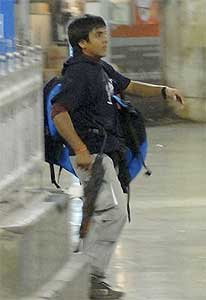
death penalty announced for Kasab

A 22 year old, Mohammed Ajmal Amir Kasab, the Pakistani terrorist linked to 26/11 case in India is finally announced death sentence today, may 6 2010. 
Img source: Wikipedia


Kasab was  found guilty of 80 charges under various acts including "waging war against nation" and mass murders, for which minimum punishment prescribed in law is life imprisonment and the maximum death penalty.

The prosecution, led by Ujjwal Nikam, has demanded capital punishment for the convicted terrorist while defence lawyer K P Pawar has pleaded for life imprisonment on the ground that he was blinded by religion and should be given a chance to reform.

-as quoted by the internet sources


Prosecutor Nikam, seeking death penalty for Kasab, cited nine Supreme Court judgements to show that this case fell within the purview of the "rarest of the rare" ratio laid down by the apex court to award death penalty.
"If we do not give him death, then India will be perceived as a soft target by terrorist organisations and they will continue to target us," Nikam argued before the court on Tuesday.
-yahoo news

Leave your views and opinions below

Tuesday, May 4, 2010

A safer windows home PC

http://wlplanet.com/mysafepc/

     You had probably heard or read about Microsoft's "My safe Pc" campaign announced in mid april 2010? It aims to provide basic home users a safer and a more stress free enjoyable computing experience.
Just for the records, here's what CERT says:


Facts on Online threats


  • In March 2010 alone, 900 Indian portals have been defaced
  • 3286 Indian websites hacked in 5 months, Jan – June 2009
  • $10mil losses reported through Phishing incidents from Apr- Dec 2008


*Source: CERT–In 


Of course most of us advanced users have enough experience to be aware of all malicious activities going on in the online world and are able to safe guard ourselves optimally. But its often the home users that seem to fall prey to untold number of virus infections, hacked accounts and more. Microsoft has taken one small step to provide a little more safeguard to such users. 


Here's what Microsoft quotes:
. The campaign is focused on providing a suite of free and comprehensive cutting-edge software - Windows XP Service Pack 3 (SP3) + Microsoft Security Essentials (MSE) + Internet Explorer 8 (IE8) through channels easily accessible to consumers, and is aimed at ensuring a safe and secure computing experience for PC consumers across India.

You could get my safe PC cds as supplement from leading technology magazines or maybe download your copy here at  http://wlplanet.com/mysafepc/

Free downloads section

Hi,
   This channel will host free downloads from Microsoft and Third party developers as well. Will be updated periodically. Please keep checking once in a while. Thank you.

Monday, May 3, 2010

Give your Laptop some cool makeover & customization!

        Everyone owns a laptop (ok! a PC atleast) these days. Maybe yours is the all new Dell XPS series ferrari red laptop or an alienware black, but hey so is mine, and the kid next door has one too!! There goes the joy of having something to boast about. So what if the make is all same, its not like the only one ever made in the history of man kind, but hey, what if i tell you this, you & your buddy may have the very same brand, make or config, but there are many ways by which you can make your laptop stand out from the crowd. Maybe even make it scream out your personality! By the way, some of these ideas can be pulled on your Ipods, mobile phones or just about any electronics.  Interested? Enter the Make-trix!

1.Lets work on the exteriors
Forget those limited edition specially hand painted designs from the likes of dell, Hp which cost you a bomb. Say hello to the laptop skin. This is a decal or a self adhesive vinyl with some really cool designs ready-made, costs around 4$-10$ (500rs) in my neighborhood. It goes onto the frontal faceplate of your laptop. Don't worry, they can be peeled off easily! Some manufacturers might even let you customize your design, just give them your design or maybe your favorite wallpaper and they'll be happy to print it out for you. Here's some for inspiration
All images are copyrights of respective owners


2.LEDs on side panels
      There are some custom made solar powered stick-on LEDs available here for about 10 to 20$ but getting your hands on these might be difficult. As an alternative, use USB powered tube LED lights which looks like this.

If your laptop has air vents at the sides, make sure not to block them off completely when installing these LED tubes.


3.The GUI or the graphical User Interface
        Ever used an alienware laptop, you would know where i am getting at. Their UI is totally revved up with all shiny transitions and animations, custom sounds and more. But alienwares are not the only one with such UI, with a little bit of third party softwares, you can fine tune your UI or maybe even have the same look of an alienware with the alien skin and the alien UI.
Yes, alienware is so generous that it actually gives you a free lite version of their Alien GUI. The software is called alienGUI and its available for free at their website here. Thankyou Aliens!!

Apart from this, you must have heard about the shell managers or software such as "window blinds" from stardock, which has loads of shells/themes to choose from! These are much different from the normal windows theme manager. Sci fi, gaming, movies, grunge, you name it, they've got it! It customizes everything from the visual screens to the system sounds you hear during boot up or whatsoever. but the flipside is, they are not free. But yeah, you could try out a trial version here.

4.System sounds [optional]
      Ok maybe you wanna go that one step further where the eagles dare, customize the system sounds all by yourself. You can do that by going into the sound manager option in windows system, where they sounds are neatly categorized. All you have to do is make your self a recording or maybe a rip in WAV format, replace the system sounds with yours and you are done!

The next time you bring out your laptop from the bag, its gonna look all bad-ass with shiny lights and when  booting up you hear your baby speak "Welcome to Skynet,-your name here-" Now go ahead and flaunt your laptop!!

Find out how much is your website worth

              Have you been running a website of your own, maybe personal webpages, portfolio webpages, or maybe a large scale corporate website?? How long have you been owning it? By the way, do you know how much is your website worth now? Maybe depending on the popularity and stats, you could even sell it off to someone. Yes, In real money! Let me show you how to find that out.

There are whole load of scripted websites that show you how to find your website's value or worth. Just typing in "my site worth" in your favorite search engine (read Google) will bring up loads of pages claiming to calculate your site's estimated value. Here's a list of sites that are trustworthy to calculate your site's worth. I'm not saying that the others are bloated, just that, I've never tried it out on those. They are completely free! So without much further talk, here they are:

Website Outlook
This is a very good site that gives you a detailed cost analysis of your webpage in generously well laid out graphs and chart. All you have to do is visit the above link and type in your webpage URL. Under few seconds, their script crawls your page and you are presented with the results.

For example instructions, I keyed in wordpress's url and here's how the result page looks like.


Title
WordPress.com — Get a Free Blog Here
Daily Pageview
68750000
Daily Ads Revenue
$206253


Wordpress.Com Estimated Worth $297 Million USD


How cool's that?  Now, go ahead and check out your website's worth! Here's some more sites that are similar to website outlook.

Websitevaluecalculator, mywebsiteworth, URL appraisal

Who knows, few years down the line, your website may be worth millions ;)
Hope this cheers u up!

Saturday, May 1, 2010

free apps for windows mobile

10 FREE Cool apps for windows mobile users

           Hey, so you are a proud owner of a shiny phone that runs Microsoft Windows Mobile? Impressive enough! Here’s top 10 must have 100% freewares that’s guaranteed to spice up your device!


PRODUCTIVITY
1. Your Personal Secretary!
For people who are “too busy” to answer a phone call, here’s one cool app that begs your attention. Say hello to Mobile secretary, an app that silently runs in the background carefully sending “I’m busy messages” to people whose calls you have missed! ;)
A preset message with custom text can be configured which is sent to all, select or anonymous callers as per your preference.
2. Carry my books!
For people who love reading e-books, Foxit PDF reader is the way to go truly mobile! This software lets you read all your PDF/e-books on your windows mobile. Now go ahead, carry all those eBooks in your pocket!

3. Thy call’eth van gogh!
So you think you can paint? Can you sketch out your works in parking lot? How about the ticket counter, or at the park? Well, now you can! Say hello to “Vs painter lite”, a full fledged painting software for that win mo. This amazing ppc software lets you paint and draw you’re your stylus, resembling a digital tablet pad! Definitely a great way to sketch your ideas that just crop up at unearthly time and place. Power of colors, now in your palm!
4. Size Matters??
Yes, we all love to hate our tiny Windows mobile onscreen keyboard. If only it was a little bigger…Well, Get Swype! A nice glossy looking keyboard that’s big enough for your fingers and allows you to swipe across the screen for predictive text input.
5. Secure my Pw3D!!
Do you have a load of user accounts on every existing website out in the wild? Or maybe you have multiple email accounts that gets you clicking the “Forgot Password” button each time you want to log in. Maybe we all are too paranoid to write down our credentials. Here’s one good application that will manage all your passwords. Just remember one little password for the app, let it do the rest.

EVERYTHING ELSE
6. Movies on the move= Magic!
Sure Windows Media player is good enough, but how many times has it failed to playback your flvs,div x or other format avi? Try the “Core player” that performs extremely well and can play almost all of your video formats in your mobile! Yes it plays music files too.

7. For the Adrenaline Junky!
If your Win-Mo has GPS, say hello to Sporty Pal, One nifty appz you wanna take along with you on your morning job. It does a good job of keeping track of your jog, biking, exercise sessions in personal profile system. Calculates hours exercised, calories burnt and stuff.

8. Accelerometer + Gaming!
Modern day Win-Mo like the HTC diamond & others, come with gravity sensors or accelerometers as they call it technically, offers loads of hours of entertainment on the move. Follow the link here and choose the one you like! Psst, there’s one for the “grown ups” too ;)
And hey, try out Guitar Hero III for mobile, Not free but hey an hour of fun is worth it.

9.Your own gig!
This is the most recommended appz and I personally love it. Get your own music band for free! Welcome the Omniano, a cool app that absolutely rocks when it comes to busting loads of time. You get a touch drum kit, a piano and a flute! Yes, its FLUTE! Similar to the iphone appz, just blow into the microphone and it plays flute in 6 different notes!

10.Social Networking
Move along, you probably have this installed already! It’s the twitter, facebook, orkut, blog minis that enable you to tweet, blog, scream out to the web right from your mobile in the discomfort of the roads! ;)
Try out these apps and let me know how you liked em! All these apps are running on my ASUS win mo fine, Please verify compatibility before you install on yours.